

Hyundai's New Pleos Connect Infotainment System Is High-Tech Without Completely Losing The Plot
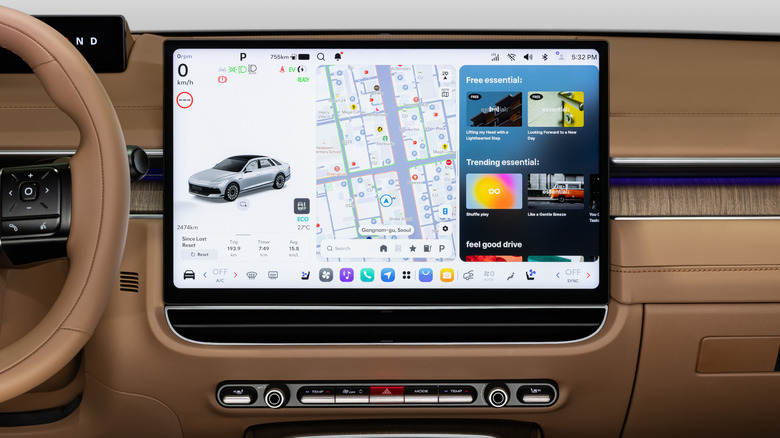
I'm sure you're bursting with excitement to learn about all the ins and outs of Hyundai Motor Group's new infotainment system, so let's get straight to it. Named Pleos, this Android Automotive-based digital ecosystem aims to make life easier using things like over-the-air updates and everyone's favorite buzzword right now: AI. More importantly, Pleos is the catalyst for Hyundai's next-generation models becoming Software Defined Vehicles, or SDVs.
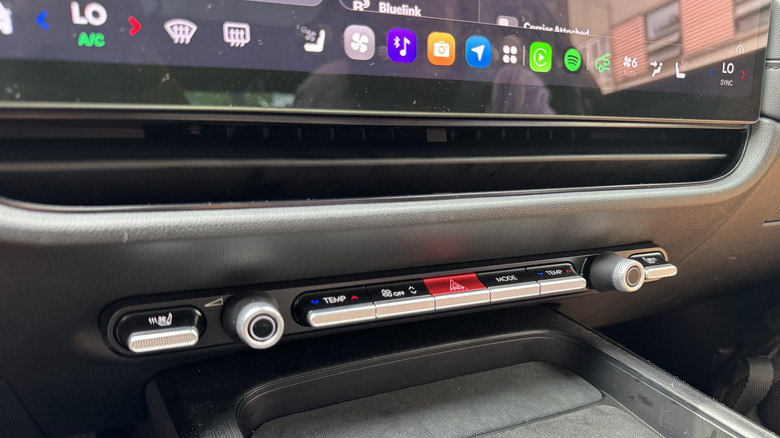
Before your vision goes red and you head to the comments to bleat about how much you hate touchscreens, know that Hyundai retained a row of physical knobs and toggle switches that live below the screen. The toggles can be used to control frequently used functions including seat heat/ventilation, climate control temperature, fan speed, climate mode, and the hazard lights, while the two knobs control volume and tuning. I got the chance to experience the Pleos system in a Korean-market Hyundai Grandeur, and found it to be intuitive for such a still-touchscreen-heavy user experience — though I wasn't able to use one of the biggest updates, the AI assistant, since it didn't speak English yet.
Full disclosure: Hyundai flew me to Seoul, South Korea, put me up in a swanky hotel, and kept me fed for a few days so I could attend its annual Investor Day, sample the company's new Pleos Connect infotainment system, drive the Korean-market Grandeur, and get a taste of the Korean culture that informs all of its products.
The nuts and bolts... or more accurately the 1s and 0s
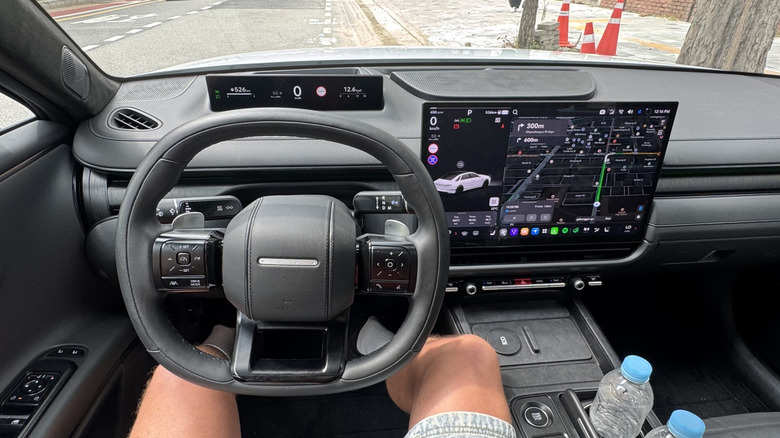
In its ultimate form, the Pleos infotainment ecosystem will include a large center infotainment screen for the usual infotainment duties, a slim screen behind the steering wheel for the driver's display, and a head-up display that projects onto the windshield. Hyundai said that some models will forego the HUD and the driver's display in order to meet lower price points in some markets — like base trims of the Ioniq 3 and Elantra in Korea and Europe — but it neither confirmed nor denied if any U.S.-bound models won't have the gauge cluster. Hyundai said it views the presence of a dedicated driver's display as a superior solution, and that it will add it wherever it can afford to do so while meeting the desired price point. But in the Genesis GV90, there's no driver display at all, with that flagship SUV getting a giant HUD and a super-wide Pleos screen that extends up in cinema mode.
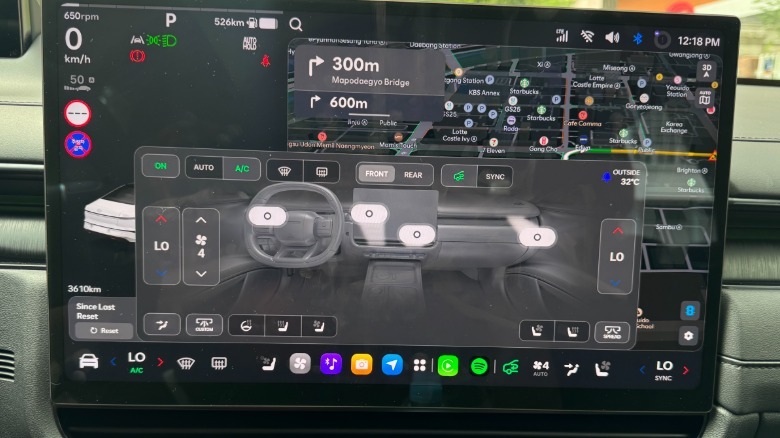
Regardless of the presence of the driver's display or the HUD, the left third of the central touchscreen always shows driving and vehicle information, much like Tesla's center screen design that first reached customers in the Model 3 in 2017. It includes current speed, speed limits, any street signs detected, a numerical rev counter, a small fuel gauge, current gear selection, and the usual trip odometer info.
The remaining two-thirds of the screen can either be dedicated to a single function such as navigation or multimedia, or the screen can be split into thirds to show the driving information as well as two different apps that share the screen all at once. And yes, it facilitates both wireless Android Auto and Apple CarPlay.
Apps and AI
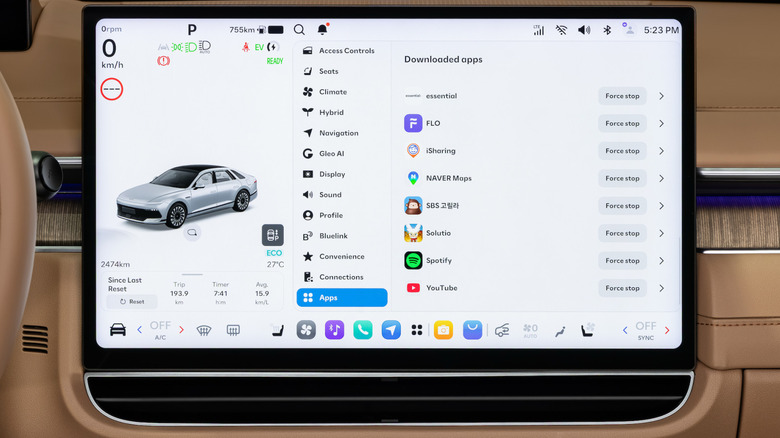
The Pleos feature that really made my ears perk up when Hyundai started talking about it is that the system is capable of downloading apps from the Android App Store, provided that they're approved by Hyundai. It goes beyond just offering preexisting apps, though. Hyundai created Pleos Connect as an open ecosystem, which means anyone can develop their own apps that could eventually become available to all Pleos users, again provided that the app meets Hyundai's strict safety and security requirements. The Pleos Playground website will give developers access to the information they need to develop their own app to customize their in-vehicle experience. When the system arrives in the U.S., it will be the first in the country with this capability.
One of the biggest points of discussion with the introduction of the Pleos system is the addition of Gleo AI, a Siri-style AI companion whose goal is to offer an interactive conversational experience that recognizes tone, intent, and memorizes contextual dialogue. It can perform operations such as opening and closing the windows, changing the climate control temperature, and folding the wing mirrors, and it can handle multiple commands at once. Eventually Gleo will remember destinations the driver has searched for and visited, and can recommend revisiting trips they may have taken a year prior. The example Hyundai gave was if someone visited a particular spot to see cherry blossoms blooming in spring, Gleo will be able to remind the driver of the trip from the year prior, and ask if the driver would like to return to that spot. This seemed like a novel feature, but not necessarily one that I've ever felt was missing from any other car I've driven.
Unfortunately Gleo couldn't speak English when I got to experience the Pleos system, so I had no firsthand experience with it and cannot speak to its real-world functionality. I was, however, able to use the Pleos system while driving Hyundai's Grandeur sedan, a frequent best-seller in Korea that we used to get in the U.S. as the Azera.
In practice
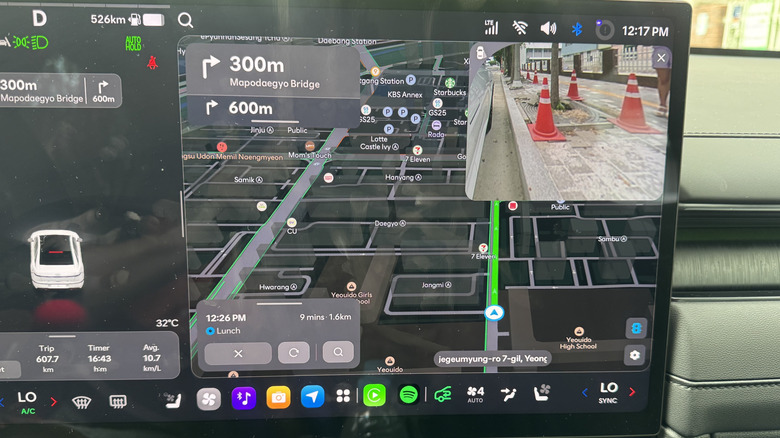
This was my first time visiting Korea, so needless to say I was intimidated by the prospect of driving in a totally unfamiliar environment with street signs that used a different alphabet, but I feel like I can offer a good perspective of how the system is to use while being mentally preoccupied. I think the system works well, but there were a lot of menus to swipe through, and the Grandeur had nowhere convenient to stabilize my hand while I tried navigating them, which posed some challenges.
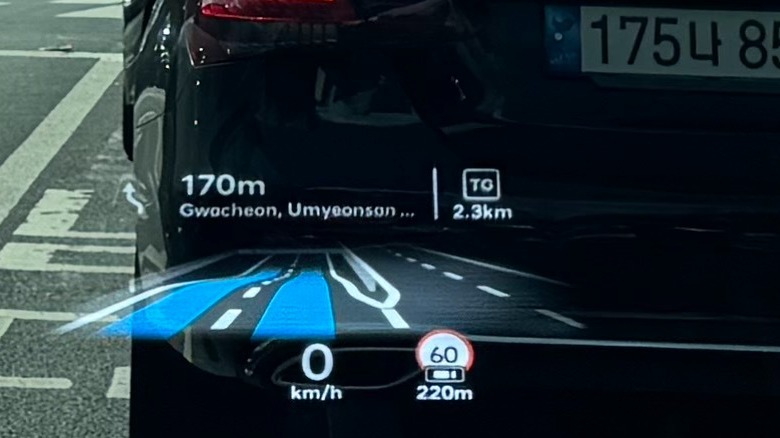
When driving, I really appreciated the compact but clear driver's display, as well as the HUD. Yes, there was a fair bit of redundant information between the three displays, but I appreciated that no matter where I was looking I could always see my speed — and mercifully my navigation instructions, too.
 Logan K. Carter/ Jalopnik
For those familiar with Hyundai Group's current infotainment system, you'll know about the blind-spot monitor cameras that pop up in the gauge cluster when you engage a turn signal. I love this function, but due to the slim driver's display, the camera feed has migrated to the center screen. Hyundai lets the driver move the camera feed around the screen so it can be positioned for convenient viewing without blocking anything important you may have on the screen when it pops up. I actually found the center-screen placement to be more handy than the current setup, especially when looking to my right to check my passenger-side blind spot, since I felt like I could easily glance between the camera feed and the physical mirror, or through the windows. It may not seem like it would be more convenient, but I truly found it to be so.
The configurable menu bar located at the bottom of the center screen was handy because it remembered what apps I used and left them quickly accessible if I needed to go back to them. Also helpful was the permanent vehicle settings icon in the bottom left of the screen, which offered a convenient way to quickly navigate to that menu, though it was blocked from my view by the steering wheel. In the Grandeur that steering wheel is a small squircle one, shaped to avoid obscuring the driver's display that's perched high on the dash, and I didn't encounter any visibility issues or usability issues with the wheel itself. It looked a bit funky but worked like a charm for me, though shorter drivers may feel differently.
One annoyance came in the form of the Grandeur's air vents. They look incredible, especially the outer vents that blended seamlessly with the dash design, but they could only be aimed using the touchscreen. That's a function that is always going to irk me personally, but again, if I owned the car, I'd just set them and forget them. We don't yet know if any future U.S.-bound Hyundai products will also be saddled with air vents like these, but at least cars like the redesigned Elantra and Tucson will have manually-adjusted vents. The row of hard buttons and controls below the screen were much appreciated, easy to use without requiring me to look away from the road, and they felt well-constructed when I toggled them up and down. Hyundai assured us that it is committed to retaining some physical controls now and in the future, which is some great news.
Pleos Connect is a well-executed infotainment ecosystem that will only get better over time
Hyundai's new infotainment ecosystem may rely too heavily on touchscreen menus for some, but I had a positive experience using it, and since it will be installed in SDVs that can be significantly altered via OTA updates, it will continuously improve over time.
If you're concerned with data farming, simply decline to share your data. Hyundai requires user consent before collecting data, and even Gleo AI is designed to store a minimal amount of user data in the safest manner possible. If a user consents to sharing their data with Hyundai, it will delete all user data once the purpose for collection is resolved, for example determining which features owners use most often or least often. Pleos Connect apps and newly developed ones will have to pass two layers of rigorous cybersecurity tests before they become available on any vehicles.
 Logan K. Carter/ Jalopnik
Overall, I think Pleos strikes a good balance between technological integration and ease-of-use. I'd want a shelf or somewhere to stabilize the hand to ease the process of trying to make on-screen selections while driving (something the new Elantra has, for instance), and I hope U.S.-bound models won't have screen-adjusted air vents, but I thoroughly appreciated the redundancy of information provided on the driver's display and on the HUD. Like all infotainment systems, it will take some getting used to, but once the familiarization period is over, I think Pleos will feel just like using any other touchscreen device with a certain fruit on the back of it.