

How Does Ford's Pro Trailer Backup Assist Let You Steer Your Truck Without The Steering Wheel?
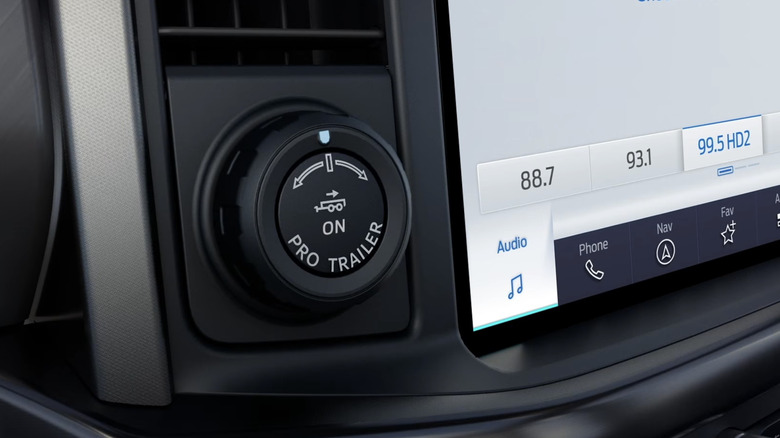
Perhaps you're someone who doesn't tow all that much and therefore isn't familiar with the art of hitching a trailer and backing it up without fumbling the entire process. Fortunately, Ford has its Pro Trailer Hitch and Backup Assist to help you not look like a total idiot, such as James and Jeremy, for example, during one of the Grand Tour episodes shot in Canada. While the Pro Backup Assist has been available since 2015, the Pro Trailer Hitch Assist is a fairly new addition, debuting in 2023. You'll find both trailer-assist features in a lot of Ford vehicles, including the full-size F-150 and the compact Maverick hybrid pickup.
Basically, Ford's Pro Trailer Backup Assist lets you back up a trailer semi-autonomously by using a knob located near the infotainment screen. Twist the knob in the direction you want the trailer to go, and let the truck figure out the rest, which includes taking over the steering wheel. The computer brain does all the heavy lifting, piecing together information gathered from the vehicle's surround-view cameras, its bevy of sensors, and the trailer profiles (explained below) to cleverly guide the trailer while you manage throttle and brake inputs. The Pro Trailer Hitch Assist (different from the Dynamic Hitch Assist) takes things one step further by controlling the speed and vehicle braking to align the hitch ball directly underneath the coupler.
However, for the Pro Trailer Backup Assist to work properly, it has to be calibrated first. This part is crucial because only then can the system accurately detect the trailer angle relative to the vehicle and relay that information over to the computer so that it can calculate the required steering inputs.
Calibrating Ford's Pro Trailer Backup Assist
Begin by setting up a trailer profile, which is pretty straightforward — add a name, choose a trailer type, input dimensions, trailer weight, and so on. To start the calibration process, you'll have to position a sticker, which comes with the package, in an unobstructed area below the backup camera and within 4 to 19 inches from the center of the hitch ball. For gooseneck and fifth-wheel trailers, you'll have to use a sensor kit, as demonstrated in this YouTube video from Ford. The yaw rate sensor has to be positioned a certain way and mounted correctly for the system to perform its magic.
Once these are properly installed, it's all a matter of following on-screen instructions, which involve driving straight and turning left and right whenever prompted. A notification should pop up on the infotainment screen telling you that the calibration is complete. Bear in mind that this calibration exercise is a one-time thing, unless, of course, you switch to another trailer, in which case, recalibration would be necessary. Ford lets you save up to 10 different trailer profiles, but advises against reusing the stickers, which you'll receive multiple of.
After you've set everything up as it should be, you can now go about your business and push the Pro Trailer button whenever you need assistance with parking one of your ten saved trailers. However, if you'd like to take control of the wheel but aren't sure how to maneuver, then Ford's Trailer Reverse Guidance should help you figure that out.